|
|---|
これは日々の作業を通して学んだことや毎日の生活で気づいたことをを記録しておく備忘録である。
HTML ファイル生成日時: 2026/10/15 08:19:17.485 (台灣標準時)
DEM (Digital Elevation Model) というデータが公開されているということを 知ったでござる。 DEM データをダウンロードすれば、地形を三次元の形状と して可視化することができそうで面白そうでござる。 DEM データをダウンロー ドする方法を調べて、そしてダウンロードを試してみたので、その方法を記録 しておくでござる。
bmi-topography という Python のパッケージがあるようで、それを使えば、 DEM データをダウンロー ドできるようでござる。
pkgsrc 用の bmi-topography のパッケージを作ってみたでござる。
https://bmi-topography.csdms.io/en/latest/#examples に基本的な使い方が書いてあるので、これを読めば DEM データをダウンロー ドできるようになるでござる。以下のような Python のスクリプトを書いてみ たでござる。
#!/usr/pkg/bin/python3

#
# Time-stamp: <2026/01/04 16:28:40 (UT+08:00) daisuke>
#

# importing argparse module
import argparse

# importing math module
import math

# importing sys module
import sys

# importing shutil module
import shutil

# importing bmi_topography module
import bmi_topography

# initialising a parser
descr  = f'fetching DEM data and storing data into GeoTiff file'
parser = argparse.ArgumentParser (description=descr)

# choices
list_demsource = (
    'AW3D30', \
    'AW3D30_E', \
    'SRTMGL1', \
    'SRTMGL3', \
    'NASADEM', \
    'COP30', \
    'COP90', \
    'GEDI_L3', \
)

# adding arguments
parser.add_argument ('-l', '--longitude', type=float, default=0.0, \
                     help='longitude in degree [EPSG:4326] (default: 0.0)')
parser.add_argument ('-b', '--latitude', type=float, default=0.0, \
                     help='latitude in degree [EPSG:4326] (default: 0.0)')
parser.add_argument ('-w', '--width', type=float, default=0.0, \
                     help='width of the map in km (default: 0.0)')
parser.add_argument ('-d', '--demsource', default='AW3D30', \
                     choices=list_demsource, \
                     help='source of DEM (default: AW3D30')
parser.add_argument ('-o', '--output', default='dem.tif', \
                     help='output DEM GeoTiff file (default: dem.tif)')
parser.add_argument ('-k', '--apikey', default='', \
                     help='OpenTopography API key')
parser.add_argument ('-v', '--verbose', action='store_true', \
                     help='verbose mode')
parser.add_argument ('-c', '--clearcache', action='store_true', \
                     help='clearing cache')

# parsing arguments
args = parser.parse_args ()

# input parameters
longitude_centre_wgs84_deg = args.longitude
latitude_centre_wgs84_deg  = args.latitude
width_km                   = args.width
dem_source                 = args.demsource
file_output                = args.output
api_key                    = args.apikey
verbose                    = args.verbose
clear_cache                = args.verbose

# if API key is empty, then use a demo API key
if (api_key == ''):
    api_key = 'demoapikeyot2022'

# constants
earth_equatorialradius_m = 6378137.0
earth_circumference_m    = 2.0 * math.pi * earth_equatorialradius_m

# check of longitude, latitude, and width
if ( (longitude_centre_wgs84_deg < -180.0) \
     or (longitude_centre_wgs84_deg > +180.0) \
     or (latitude_centre_wgs84_deg < -90.0) \
     or (latitude_centre_wgs84_deg > +90.0) \
     or (width_km <= 0.0) ):
    # printing message
    print (f'#')
    print (f'# ERROR: Something is wrong with longitude or latitude or width!')
    print (f'# ERROR: Longitude: {longitude_centre_wgs84_deg} deg')
    print (f'# ERROR: Latitude:  {latitude_centre_wgs84_deg} deg')
    print (f'# ERROR: Width:     {width_km} km')
    print (f'#')
    # stopping the script
    sys.exit (0)

# calculation of the region of interest
width_deg = width_km * 1000.0 / earth_circumference_m * 360.0
west_edge_wgs84_deg  = longitude_centre_wgs84_deg - width_deg * 0.5
east_edge_wgs84_deg  = longitude_centre_wgs84_deg + width_deg * 0.5
south_edge_wgs84_deg = latitude_centre_wgs84_deg - width_deg * 0.5
north_edge_wgs84_deg = latitude_centre_wgs84_deg + width_deg * 0.5

# printing input parameters
if (verbose):
    print (f'#')
    print (f'# fetching DEM data')
    print (f'#')
    print (f'#  Input parameters')
    print (f'#   Longitude   : {longitude_centre_wgs84_deg} deg')
    print (f'#   Latitude    : {latitude_centre_wgs84_deg} deg')
    print (f'#   Width       : {width_km} km = {width_deg:8.5f} deg')
    print (f'#   DEM source  : {dem_source}')
    print (f'#   Output file : {file_output}')
    print (f'#')

# settings for DEM data retrieval
dem_request = bmi_topography.topography.Topography (dem_type=dem_source, \
                                                    south=south_edge_wgs84_deg, \
                                                    north=north_edge_wgs84_deg, \
                                                    west=west_edge_wgs84_deg, \
                                                    east=east_edge_wgs84_deg, \
                                                    api_key=api_key)

# clearing cache
if (clear_cache):
    dem_request.clear_cache ('~/.bmi_topography')

# downloading DEM data
file_dem = dem_request.fetch ()

# copying cache file to output file
shutil.copy2 (file_dem, file_output)

# printing information of downloaded data
if (verbose):
    data_dem = dem_request.load ()
    print (data_dem)
    print (data_dem.spatial_ref)
実行してみた結果は以下の通りでござる。
% python3 fetch_dem.py -v -l 121.42260 -b 24.70336 -w 20 -o lalashan.tif
#
# fetching DEM data
#
#  Input parameters
#   Longitude   : 121.4226 deg
#   Latitude    : 24.70336 deg
#   Width       : 20.0 km =  0.17966 deg
#   DEM source  : AW3D30
#   Output file : lalashan.tif
#
/usr/pkg/lib/python3.13/site-packages/bmi_topography/api_key.py:49: UserWarning: You are using a demo key to fetch data from OpenTopography, functionality will be limited. See https://bmi-topography.csdms.io/en/latest/#api-key for more information.
  warnings.warn(
<xarray.DataArray 'AW3D30' (band: 1, y: 647, x: 647)> Size: 837kB
[418609 values with dtype=int16]
Coordinates:
  * band         (band) int64 8B 1
  * x            (x) float64 5kB 121.3 121.3 121.3 121.3 ... 121.5 121.5 121.5
  * y            (y) float64 5kB 24.79 24.79 24.79 24.79 ... 24.61 24.61 24.61
    spatial_ref  int64 8B 0
Attributes:
    AREA_OR_POINT:  Area
    scale_factor:   1.0
    add_offset:     0.0
    units:          degrees
<xarray.DataArray 'spatial_ref' ()> Size: 8B
array(0)
Coordinates:
    spatial_ref  int64 8B 0
Attributes:
    crs_wkt:                      GEOGCS["WGS 84",DATUM["WGS_1984",SPHEROID["...
    semi_major_axis:              6378137.0
    semi_minor_axis:              6356752.314245179
    inverse_flattening:           298.257223563
    reference_ellipsoid_name:     WGS 84
    longitude_of_prime_meridian:  0.0
    prime_meridian_name:          Greenwich
    geographic_crs_name:          WGS 84
    horizontal_datum_name:        World Geodetic System 1984
    grid_mapping_name:            latitude_longitude
    spatial_ref:                  GEOGCS["WGS 84",DATUM["WGS_1984",SPHEROID["...
    GeoTransform:                 121.3325000000425 0.0002777777777778173 0.0...
% file lalashan.tif
lalashan.tif: TIFF image data, little-endian, direntries=18, height=647, bps=16, compression=LZW, PhotometricIntepretation=BlackIsZero, width=647
DEM データをダウンロードできたようなのでござるが、デモ用の API key を 使ったので、すべての機能を利用できているわけではないようでござる。
API key を入手しないといけないようでござる。 API key の入手方法につい ては、以下に記述があるでござる。
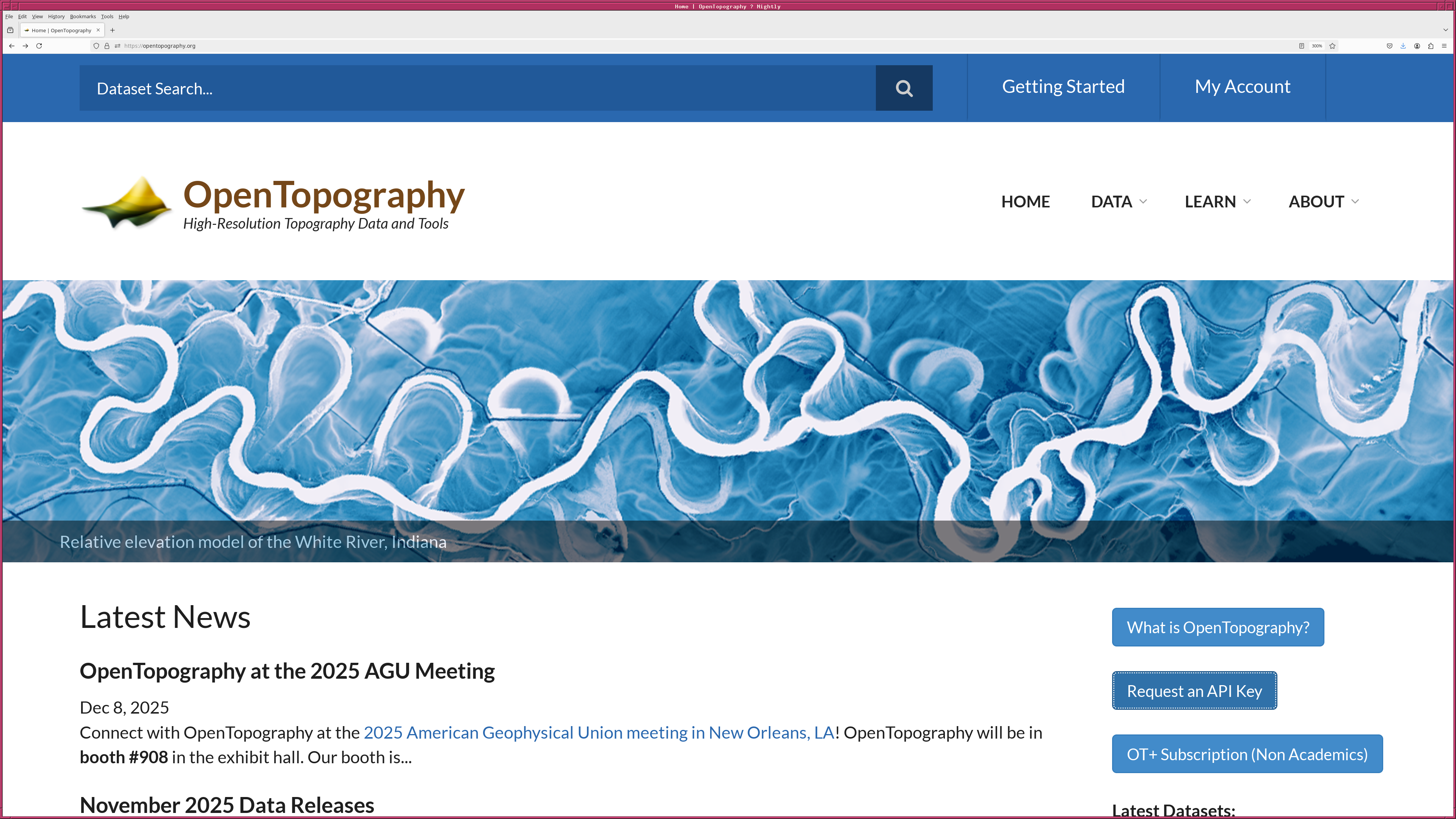
https://opentopography.org/ を見てみると、 "Request an API Key" というボ タンががあるでござる。このボタンを押して、登録のためのページに行き、必 要事項を記入すると、メールが送られてくるので、そのメールに書いてあるリ ンクをクリックすると、自分に対して発行された API key がわかるでござる。|
|
|---|
API key を入手したので、それを使って実行した結果が以下の通りでござる。
% python3 fetch_dem.py -v -l 121.42260 -b 24.70336 -w 20 -o lalashan2.tif -k 0123456789abcdefghijklmnopqrstuv -c
#
# fetching DEM data
#
#  Input parameters
#   Longitude   : 121.4226 deg
#   Latitude    : 24.70336 deg
#   Width       : 20.0 km =  0.17966 deg
#   DEM source  : AW3D30
#   Output file : lalashan2.tif
#
rm /home/daisuke/.bmi_topography/AW3D30_24.613528471588047_121.33276847158805_24.793191528411953_121.51243152841195.tif
<xarray.DataArray 'AW3D30' (band: 1, y: 647, x: 647)> Size: 837kB
[418609 values with dtype=int16]
Coordinates:
  * band         (band) int64 8B 1
  * x            (x) float64 5kB 121.3 121.3 121.3 121.3 ... 121.5 121.5 121.5
  * y            (y) float64 5kB 24.79 24.79 24.79 24.79 ... 24.61 24.61 24.61
    spatial_ref  int64 8B 0
Attributes:
    AREA_OR_POINT:  Area
    scale_factor:   1.0
    add_offset:     0.0
    units:          degrees
<xarray.DataArray 'spatial_ref' ()> Size: 8B
array(0)
Coordinates:
    spatial_ref  int64 8B 0
Attributes:
    crs_wkt:                      GEOGCS["WGS 84",DATUM["WGS_1984",SPHEROID["...
    semi_major_axis:              6378137.0
    semi_minor_axis:              6356752.314245179
    inverse_flattening:           298.257223563
    reference_ellipsoid_name:     WGS 84
    longitude_of_prime_meridian:  0.0
    prime_meridian_name:          Greenwich
    geographic_crs_name:          WGS 84
    horizontal_datum_name:        World Geodetic System 1984
    grid_mapping_name:            latitude_longitude
    spatial_ref:                  GEOGCS["WGS 84",DATUM["WGS_1984",SPHEROID["...
    GeoTransform:                 121.3325000000425 0.0002777777777778173 0.0...
% file lalashan2.tif
lalashan2.tif: TIFF image data, little-endian, direntries=18, height=647, bps=16, compression=LZW, PhotometricIntepretation=BlackIsZero, width=647
警告が表示されてはいたようでござるが、 20-km 四方の領域ならば、自分の API key がなくても、デモ用の API key でデータをダウンロードできるよう でござる。
全世界のデータが利用可能な DEM としては、アメリカの SRTM とヨーロッパ の Coernicus と日本の ALOS World 3D があるようで、この三つについては、 どれも解像度は 30-m のようでござる。