|
|---|
これは日々の作業を通して学んだことや毎日の生活で気づいたことをを記録しておく備忘録である。
HTML ファイル生成日時: 2026/10/06 11:48:12.181 (台灣標準時)
Python を使って指定する範囲の地図をダウンロードし、 PNG 或いは PDF の ファイルとして保存する方法について調べてみたでござる。 contextily と いうパッケージを使えばよいようだとわかったでござる。
以下のようなスクリプトを書いてみたでござる。
#!/usr/pkg/bin/python3

#
# Time-stamp: <2025/12/21 11:14:25 (UT+08:00) daisuke>
#

# importing argparse module
import argparse

# importing sys module
import sys

# importing contextily module
import contextily

# importing matplotlib module
import matplotlib.backends.backend_agg
import matplotlib.figure

# initialising a parser
parser = argparse.ArgumentParser (description='fetching map using contextily')

# choices
list_mapsource = ('mapnik', 'opentopomap')

# adding arguments
parser.add_argument ('-o', '--output', default='map.png', \
                     help='output file (default: map.png)')
parser.add_argument ('-l', '--longitude', type=float, default=0.0, \
                     help='longitude in degree (default: 0.0)')
parser.add_argument ('-b', '--latitude', type=float, default=0.0, \
                     help='latitude in degree (default: 0.0)')
parser.add_argument ('-w', '--width', type=float, default=0.0, \
                     help='width of the map in degree (default: 0.0)')
parser.add_argument ('-m', '--mapsource', default='mapnik', \
                     choices=list_mapsource, \
                     help='source of the map (default: mapnik')
parser.add_argument ('-r', '--resolution', type=float, default=225.0, \
                     help='resolution of output file in DPI (default: 225)')

# parsing arguments
args = parser.parse_args ()

# input parameters
file_output      = args.output
longitude_centre = args.longitude
latitude_centre  = args.latitude
width_deg        = args.width
map_source       = args.mapsource
resolution_dpi   = args.resolution

# map source
if (map_source == 'mapnik'):
    source = contextily.providers.OpenStreetMap.Mapnik
elif (map_source == 'opentopomap'):
    source = contextily.providers.OpenTopoMap

# check of longitude, latitude, and width
if ( (longitude_centre < -180.0) or (longitude_centre > +180.0) \
     or (latitude_centre < -90.0) or (latitude_centre > +90.0) \
     or (width_deg <= 0.0) ):
    # printing message
    print (f'#')
    print (f'# ERROR: Something is wrong with longitude or latitude or width!')
    print (f'# ERROR: Longitude: {longitude_centre} deg')
    print (f'# ERROR: Latitude:  {latitude_centre} deg')
    print (f'# ERROR: Width:     {width_deg} deg')
    print (f'#')
    # stopping the script
    sys.exit (0)

# west end, east end, south end, and north end of the region to plot in deg
west_end_deg  = longitude_centre - width_deg * 0.5
east_end_deg  = longitude_centre + width_deg * 0.5
south_end_deg = latitude_centre - width_deg * 0.5
north_end_deg = latitude_centre + width_deg * 0.5
region        = (west_end_deg, east_end_deg, south_end_deg, north_end_deg)

# creating fig, canvas, and ax objects
fig    = matplotlib.figure.Figure ()
canvas = matplotlib.backends.backend_agg.FigureCanvasAgg (fig)
ax     = fig.add_subplot (111)

# settings of output map
ax.axis ("off")
ax.set_aspect("equal")
ax.axis (region)
contextily.add_basemap (ax, crs="EPSG:4326", source=source)
fig.subplots_adjust (left=0.0, right=1.0, bottom=0.0, top=1.0)

# creating a map
fig.savefig (file_output, dpi=resolution_dpi, \
             bbox_inches="tight", transparent=True)
以下のように実行するでござる。
% python3 contextily_fetch_map_00.py -h
usage: contextily_fetch_map_00.py [-h] [-o OUTPUT] [-l LONGITUDE]
                                  [-b LATITUDE] [-w WIDTH]
                                  [-m {mapnik,opentopomap}] [-r RESOLUTION]

fetching map using contextily

options:
  -h, --help            show this help message and exit
  -o, --output OUTPUT   output file (default: map.png)
  -l, --longitude LONGITUDE
                        longitude in degree (default: 0.0)
  -b, --latitude LATITUDE
                        latitude in degree (default: 0.0)
  -w, --width WIDTH     width of the map in degree (default: 0.0)
  -m, --mapsource {mapnik,opentopomap}
                        source of the map (default: mapnik
  -r, --resolution RESOLUTION
                        resolution of output file in DPI (default: 225)

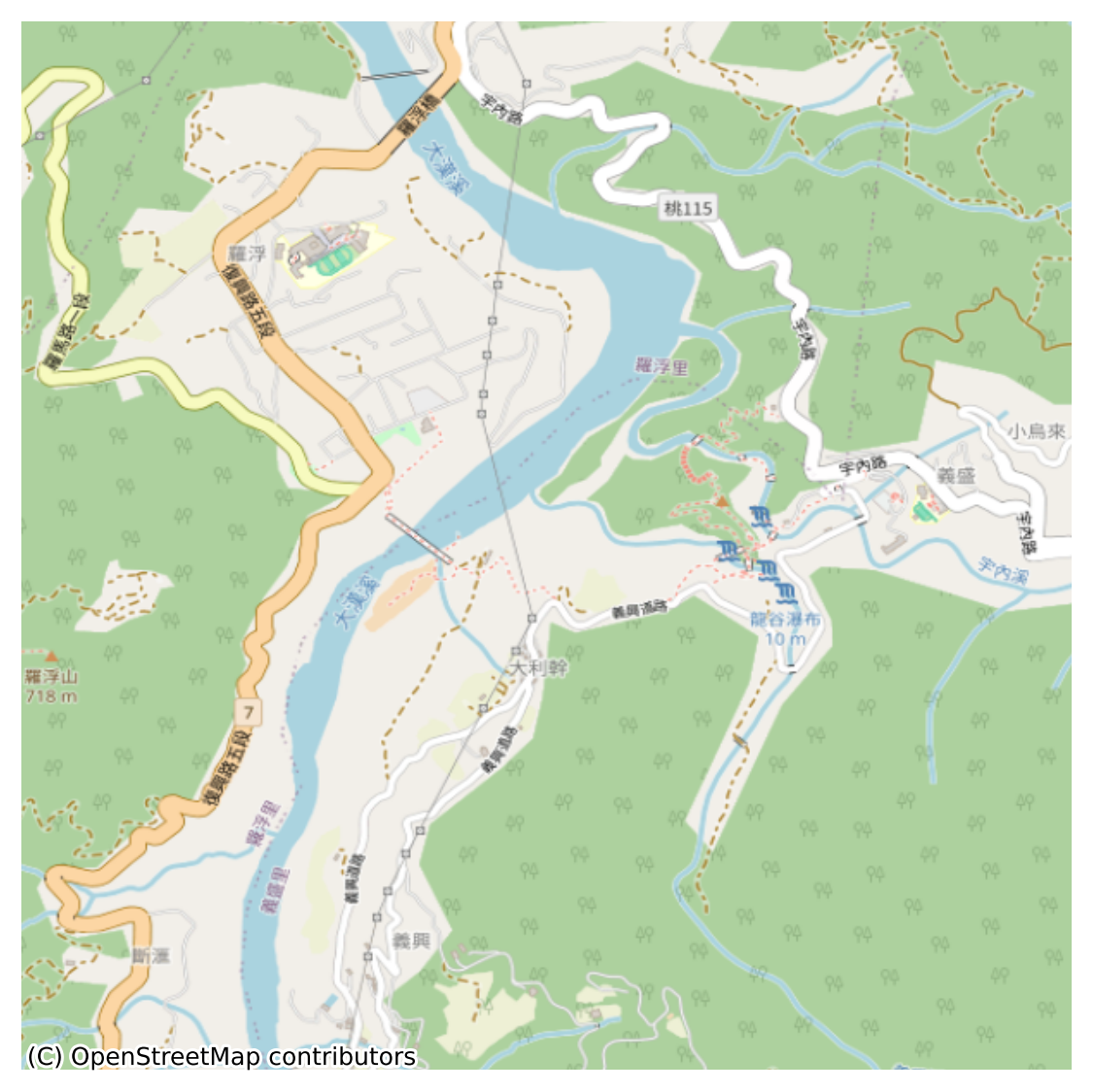
% python3 contextily_fetch_map_00.py -l 121.37 -b 24.79 -w 0.025 -m mapnik -o example.png
% ls -lF example.png
-rw-r--r--  1 daisuke  taiwan  771331 Dec 21 11:18 example.png
作成された図は以下の通りでござる。
|
|
|---|
今度は、 OpenTopoMap の地図をダウンロードしてみるでござる。
% python3 contextily_fetch_map_00.py -l 121.37 -b 24.79 -w 0.025 -m opentopomap -o example2.png
% ls -lF example*.png
-rw-r--r--  1 daisuke  taiwan   771331 Dec 21 11:18 example.png
-rw-r--r--  1 daisuke  taiwan  1869867 Dec 21 11:43 example2.png

|
|---|